
a wordpress plugin from hopkins action

Stockist Locator
Show people where to buy your stuff.
A store locator for WordPress. Shoppers type a postcode and get your nearest stockists, in a list and on a map. Pro adds native Elementor widgets and a grid view.
The free version is on wordpress.org. Pro is sold through Freemius.
Launch offer: LAUNCH30 takes 30% off your first payment until 2 November 2026. It is already applied when you click through to checkout.

the problem
people can’t buy what they can’t find.
You sell through shops. Your customers don’t know which ones. So they message you on Instagram, or they give up and buy something else. A good where-to-buy page fixes that.
what it does
a proper where-to-buy page, without the faff
search
postcode in, nearest shops out
Shoppers search by postcode, town or place name, or tap “Use my location”. Results come back sorted by distance, with a radius menu in miles or kilometres. List and map sit side by side on a computer and stack neatly on a phone.
- Opening hours, phone, email, website and directions on every result
- Limit address searches to the countries you sell in
- Works with a keyboard, and screen readers hear the result count

elementor
native Elementor widgets Pro
Four of them: Stockist Locator, Stockist Map, Stockist Search and Stockist Grid. Drag one onto the page and style it from a full Style tab: colours, type, buttons with hover states, search fields, cards, spacing, map height and list width. Your kit’s global colours are right there. And it all shows in the editor preview, so no publishing to check.

grid view
a grid of cards, for when a map is overkill Pro
Some brands would rather have a directory than a map. The grid shows every place as a card that links to its own page, with pagination. Pick the columns and how many cards per page. Use it as a block view, a shortcode or an Elementor widget.

csv import
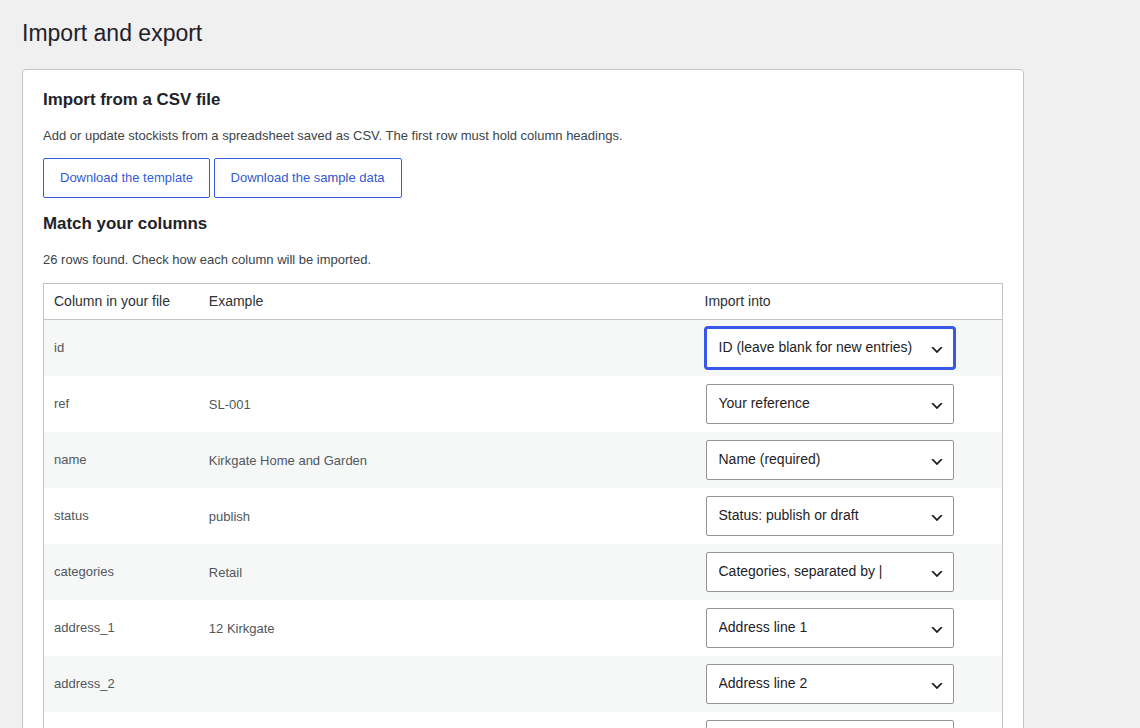
got 400 stockists in a spreadsheet? fine.
Import the CSV and match your columns. Run it again next month and it updates the places you already have instead of doubling them, matching on ID, then your own reference, then name and postcode. Export, edit in a spreadsheet, import again.
No Google key. No billing account.
Maps and address lookups come from OpenStreetMap, so it works the moment you switch it on. Want your own map style? Pro adds Mapbox.
Categories with their own colour
Retail, trade counter, showroom: each category gets its own marker colour. With Pro, upload your own marker image instead.
A page for each shop
Optional detail pages with the address, opening hours, contact links and a small map. Call them stockists, dealers, stores or locations.
free vs pro
free does the job. pro does it in Elementor.
The free version has no limits on places, categories or locators, and nothing in it stops working after a while.
| What you get | Free | Pro |
|---|---|---|
| Locator with search, results list and map | Yes | Yes |
| Postcode, town and “use my location” search, in miles or km | Yes | Yes |
| Categories with their own marker colour | Yes | Yes |
| A page for each place | Yes | Yes |
| CSV import and export | Yes | Yes |
| OpenStreetMap maps, no API key | Yes | Yes |
| The block, with its design panels | Yes | Yes |
| Shortcodes, CSS variables and template overrides | Yes | Yes |
| Grid of cards | No | Yes |
| Elementor widgets with a full Style tab | No | Yes |
| Mapbox map styles, lookups and suggestions while typing | No | Yes |
| Your own marker image for each category | No | Yes |
pricing
pick a plan
Every plan gets every Pro feature. The only difference is how many sites you put it on.
Yearly
Starter
1 site
£36.99 per year
- Use it on 1 website
- Every Pro feature
- For your own shop or brand
- Updates and support for a year
Most popular
Professional
5 sites
£74.99 per year
- Use it on 5 websites
- Every Pro feature
- For a handful of brands or shops
- Updates and support for a year
Agency
Unlimited sites
£135.99 per year
- Use it on as many websites as you like
- Every Pro feature
- For agencies building client sites
- Updates and support for a year
Lifetime
Starter
1 site
£97.99 one payment, updates for life
- Use it on 1 website
- Every Pro feature
- For your own shop or brand
- Updates and support for life
Most popular
Professional
5 sites
£188.99 one payment, updates for life
- Use it on 5 websites
- Every Pro feature
- For a handful of brands or shops
- Updates and support for life
Agency
Unlimited sites
£340.99 one payment, updates for life
- Use it on as many websites as you like
- Every Pro feature
- For agencies building client sites
- Updates and support for life
- Launch offer: LAUNCH30 takes 30% off your first payment until 2 November 2026. It is already applied when you click through to checkout.
- 30-day money-back guarantee. Not for you? Ask within 30 days and you get the lot back.
- Renewals are 30% off. Yearly licences renew at 30% less than the list price.
Prices exclude VAT and sales tax. Checkout and licences are handled by Freemius, which sells the licence to you as merchant of record and adds any tax due where you live at checkout. Businesses can enter a VAT number there.
built for designers
style it to match your site
Designers and agencies get the controls they actually want. Style it from the panels, from your CSS, or from scratch.

CSS variables
Over 40 custom properties on .sl-root. Set --sl-accent and the buttons, tags, clusters and selected card follow. The defaults sit in :where(), so your CSS always wins.
Block design panels
Colour, typography, spacing, border and shadow in the block’s Styles tab. Each one restyles the whole locator, right down to the cards and buttons. theme.json block styles work too.
Elementor widgets Pro
A Style tab with sections for colours, typography, buttons, search fields, cards, spacing and the map. Responsive map height and list width.
Template overrides
Copy any template into your theme and edit it. Stable BEM class names, JavaScript events, and a “use my theme’s styles only” switch for starting from bare markup.
more reading
questions
the honest answers
Do I need a Google Maps API key?
No. Maps and address lookups use OpenStreetMap, so there is no key to find and no billing account to set up. If you want your own map style, Pro adds Mapbox.
Will it work with my theme?
It uses your theme’s fonts and has been tested with a block theme (Twenty Twenty-Five) and a classic one (Twenty Twenty-One). It works in any page builder through its shortcodes, and Pro adds native Elementor widgets. If your theme needs it, “use my theme’s styles only” hands the styling over completely.
How many sites can I use it on?
Starter covers one site, Professional covers five and Agency covers as many as you like. You can move a licence from one site to another.
What happens when my licence runs out?
The plugin keeps working. Your stockists, settings and the free features carry on: the locator, the block and the shortcodes. Updates and support stop, and the Pro features switch off until you renew.
Can I get a refund?
Yes. There is a 30-day money-back guarantee. If it’s not right for you, ask within 30 days and you get your money back.
How long does a big import take?
Rows that already have a latitude and longitude are ready straight away. The rest are looked up at one a second, so 600 addresses take about ten minutes. You can leave the page while it finishes.
get your stockists on the map.
Start with the free version, or go straight to Pro.
Launch offer: LAUNCH30 takes 30% off your first payment until 2 November 2026. It is already applied when you click through to checkout.